字符串广泛应用在 Java 编程中,在 Java 中字符串属于对象,Java 提供了 String、StringBuffer、StringBuilder类来创建和操作字符串。
String
创建对象
1 | public class Main{ |
运行结果
这是字符串1
这是字符串3
String 类有 11 种构造方法,这些方法提供不同的参数来初始化字符串,比如提供一个字符数组参数:
1 | public class Main{ |
运行结果
China
注意:String 类是不可改变的,所以你一旦创建了 String 对象,那么它的值就不能改了。
常用方法
| 方法 | 说明 |
|---|---|
| int length() | 返回当前字符串的长度 |
| int indexOf(int ch) | 查找ch字符在该字符串中第一次出现的位置 |
| int indexOf(String str) | 查找str子字符串在该字符串中第一次出现的位置 |
| int lastIndexOf(int ch) | 查找ch字符在该字符串中最后一次出现的位置 |
| int lastIndexOf(String str) | 查找str子字符串在该字符串中最后一次出现的位置 |
| String substring(int beginIndex) | 获取从beginIndex位置开始到结束的子字符串 |
| String substring(int beginIndex,int endIndex) | 获取从beginIndex位置开始到endIndex位置的子字符串[beginIndex,endIndex) |
| String trim() | 返回去除了前后空格的字符串 |
| boolean equals(Object obj) | 将该字符串与指定对象比较,返回true或者false |
| String toLowerCase() | 将字符串转换为小写 |
| String toUpperCase() | 将字符串转换为大写 |
| char charAt(int index) | 获取字符串中指定位置的字符 |
| String[] split(String regex,int li) | 将字符串分割为子字符串,返回字符串数组 |
| byte[] getBytes() | 将该字符串转换为byte数组 |
这里先介绍length()、charAt()、substring()、indexOf()、lastIndexOf()的方法
1 | public class Main{ |
运行结果
字符串长度:18
字符串中第5个位置是:程
从4位置开始到结束的子字符串:编程基础,我喜欢Java编程
从4位置开始到6位置结束的子字符串:编程
查找“编程”在该字符串中第一次出现的位置:4
查找“编程”在该字符串中最后一次出现的位置:16
从8位置开始,查找子串“编程”第一次出现的位置:16
字符串和 byte 数组之间相互转换
1 | public class Main{ |
运行结果
74 97 118 97 32 -25 -68 -106 -25 -88 -117 32 -27 -97 -70 -25 -95 -128
Java 编程 基础
为什么会出现这么一堆东西?
这一堆数字其实就是字符串每一位所对应的ASCII码值,J的ASCII码值是74,a的ASCII码值是97,空格的ASCII码值是32,以此类推。那么负数是什么呢,因为默认用的是UTF-8编码,所以这里每三个负数对应一个汉字,即“编”对应-25 -68 -106,“程”对应-25 -88 -117。
在 String 中,除了有String(byte[] bytes)这个构造方法以外,还有一个构造方法String(byte[] bytes,Charset charset),Charset 字符集。我们来看下面的代码
1 | import java.io.UnsupportedEncodingException; |
运行结果
74 97 118 97 32 -25 -68 -106 -25 -88 -117 32 -27 -97 -70 -25 -95 -128
Java 缂栫▼ 鍩虹
出现乱码了!为什么会这样?
这是因为 String 转 byte 数组的时候用的是UTF-8,而 byte 转 String 的时候用的却是 GBK,编码不统一导致的。
如果你就是想用 GBK 编码的话,可以这么写
1 | import java.io.UnsupportedEncodingException; |
运行结果
74 97 118 97 32 -25 -68 -106 -25 -88 -117 32 -27 -97 -70 -25 -95 -128
Java 编程 基础
存储
我们来看这么一段代码
1 | public class Main{ |
运行结果
true
true
false
true
false
true
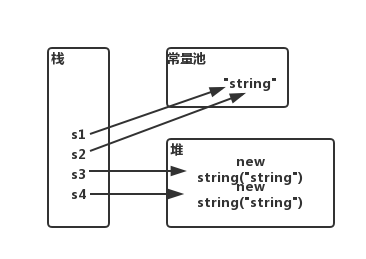
为什么会出现这样的情况呢?当你用String s1 = “string”;创建字符串的时候,“string” 是存放在常量池里的。当你又用创建 s2 的时候,因为在常量池中已经存在了一个 “string”,所以 s2 里存放的是 “string” 中的内存地址。但当你用String s3 = new String(“string”);创建对象时,他是存放在堆内存的(实例化对象都是在堆内存中开辟空间)。每创建一个对象,它就开辟一个空间。
StringBuffer和StringBuilder
前面有提到,String 是不可变的,一旦创建了 String 对象,那么它的值就不能改了。那么我们要是想要进行多次修改,就要用到 StringBuffer 和 StringBuilder 了。
和 String 类不同的是,StringBuffer 和 StringBuilder 类的对象能够被多次的修改,并且不产生新的未使用对象。
StringBuilder 和 StringBuffer 之间最大的不同是在于 StringBuilder 的方法是线程不安全的(不能同步访问)。
由于 StringBuilder 相较于 StringBuffer 有速度优势,所以多数情况下建议使用 StringBuilder。然而在要求线程安全的情况下,必须要用 StringBuffer。
StringBuilder的常用方法
| 方法 | 说明 |
|---|---|
| String toString() | 将StringBuilder对象转换为String对象 |
| StringBuilder reverse() | 将此字符序列用其反转形式取代 |
| StringBuilder append() | 追加内容到当前StringBuilder对象的末尾 |
| StringBuilder delete() | 移除此序列的子字符串中的字符。 |
| StringBuilder insert() | 将内容插入到StringBuilder对象的指定位置 |
1 | public class Main{ |
运行结果
StringBuilder字符串为:String
反转之后:gnirtS
再反转回来:String
在末尾添加“String”:StringString
删除从6位置到12位置的字符[6,12):String
在位置5上加入“nnnnn”:Strinnnnnng
String、StringBuffer和StringBuilder区别
可变性
String 类中使用字符数组保存字符串,private final char value[];,所以 String 对象是不可变的。
StringBuffer 和 StringBuilder 是继承自 AbstractStringBuilder 类,在 AbstractStringBuilder 中也使用字符数组保存字符串char[] value;没有被 final修饰,所以 StringBuffer 和 StringBuilder 都是可变的。
线程安全
String 中的对象是不可变的,也就可以理解为常量,所以是线程安全的。
AbstractStringBuilder 是 StringBuffer 和 StringBuilder 的公共父类,定义了一些字符串的基本操作,如 append()、insert()、indexOf()等公共方法。
StringBuffer 对方法加了 synchronized 或者对调用的方法加了 synchronized,所以是线程安全的。
StringBuilder 并没有对方法加锁,所以是非线程安全的。
性能
每次对 String 类型进行改变的时候,都会生成一个新的 String 对象,然后指针指向新的 String
对象。
StringBuffer 每次都会对 StringBuffer 对象本身进行改变,而不是生成新的对象并改变对象的引用。
相同情况下,使用 StringBuilder 相比使用 StringBuffer 仅能获得10%-15%的性能提升,但是要冒着线程不安全的风险。
总结
String:操作少量的数据
StringBuilder:单线程下操作大量数据
StringBuffer:多线程下操作大量数据
==和equals()方法
==
它的作用是比较两个对象的地址是不是相等的。即,判断两个对象是不是同一个对象。(基本数据类型\==比较的是值,引用数据类型\==比较的是内存地址)
equals()
它的作用也是判断两个对象是否相等,但它一般有两种使用情况:
情况一
类没有覆盖 equals() 方法。则通过 equals() 比较该类的两个对象是,等价于通过“==”比较这两个对象。
情况二
类覆盖了 equals() 方法。一般,我们都覆盖 equals() 方法来判断两个对象的内容是否相等。若他们的内容相等,则返回 true(即,认为这两个对象是相等的)。
举个例子:
1 | public class Main{ |
运行结果
aa == bb
aEQb
true
说明:
- String 中的 equals() 方法是被重写过的,因为 Object 的 equals() 是比较的对象的内存地址,而 String 的 equals 方法比较的是对象的值
- 当创建 String 类型的对象时,虚拟机会在常量池中查找有没有已经存在的值和要创建的值相同的对象,如果有,就把它赋给当前的引用,如果没有就在常量池中重新创建一个 String 对象。